ChatGPT vs Gemini vs Claude and Other AI Tools Compared
ChatGPT vs Gemini is one of the most common questions people ask when choosing an AI assistant, and the answer depends on your task. Comparing AI tools is most useful when every tool gets the same task and is judged against the same criteria. This AIToolNest page brings together the main comparison groups and shows you how to test them yourself, because features and pricing change often.
ChatGPT vs Gemini vs Claude: all-purpose AI assistants
| Criteria | ChatGPT | Claude | Gemini |
|---|---|---|---|
| Developer | OpenAI | Anthropic | |
| Where to use it | Web, apps | Web, apps | Web, apps, Google products |
| Pricing and limits | Check current pricing on the official sites | ||
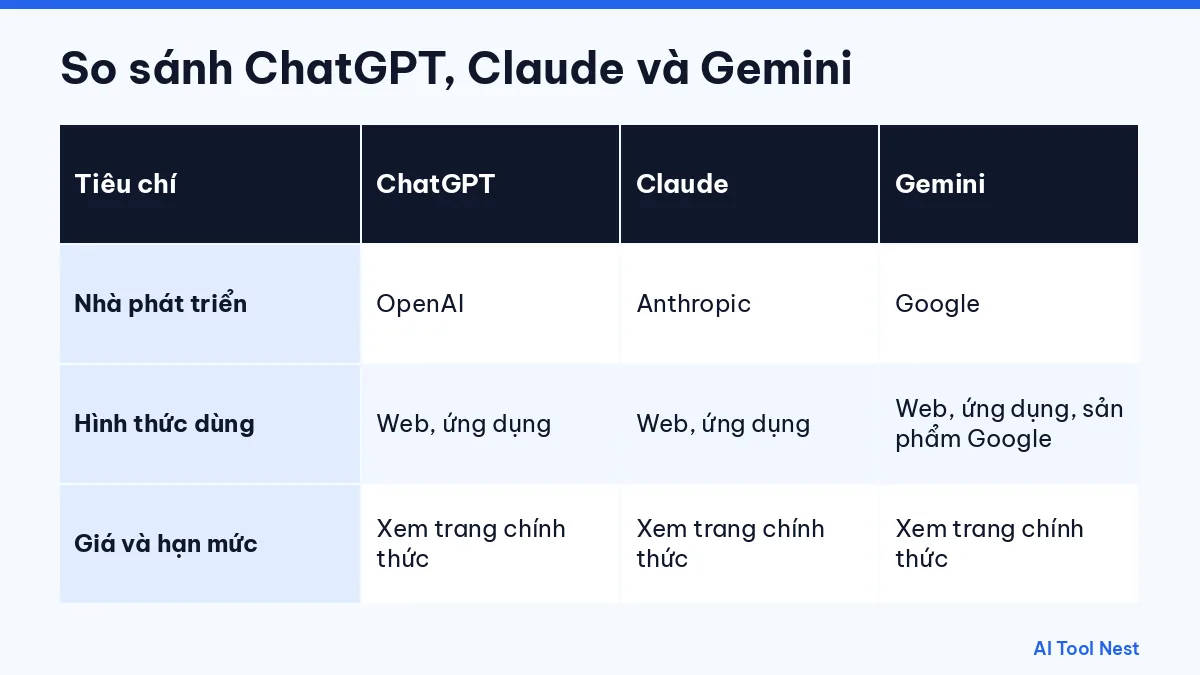
All three handle conversation, drafting and summarizing. The real differences lie in the quality of the output on your own content, the ecosystem you already use and the limits of each plan.
ChatGPT vs Gemini: how should you test them?
ChatGPT is developed by OpenAI; Gemini is Google’s AI assistant, available on the web, in mobile apps and inside several Google products. If your work is closely tied to the Google ecosystem, that is worth weighing. Beyond that, the fairest approach is to run the same prompt with the same sample data in both tools, then compare accuracy, editing time and language quality. Note which plan you are on, because features and limits differ between plans. For a detailed side-by-side, read our ChatGPT vs Gemini comparison.
Other comparison groups
Image generation and design
See Canva AI for quick design work that combines images with ready-made layouts.
Video and audio
Look at Runway for video and ElevenLabs for voiceovers when you build a content production workflow.
Coding
GitHub Copilot works inside your IDE; all-purpose assistants can also explain code in a chat.
How to compare AI tools yourself
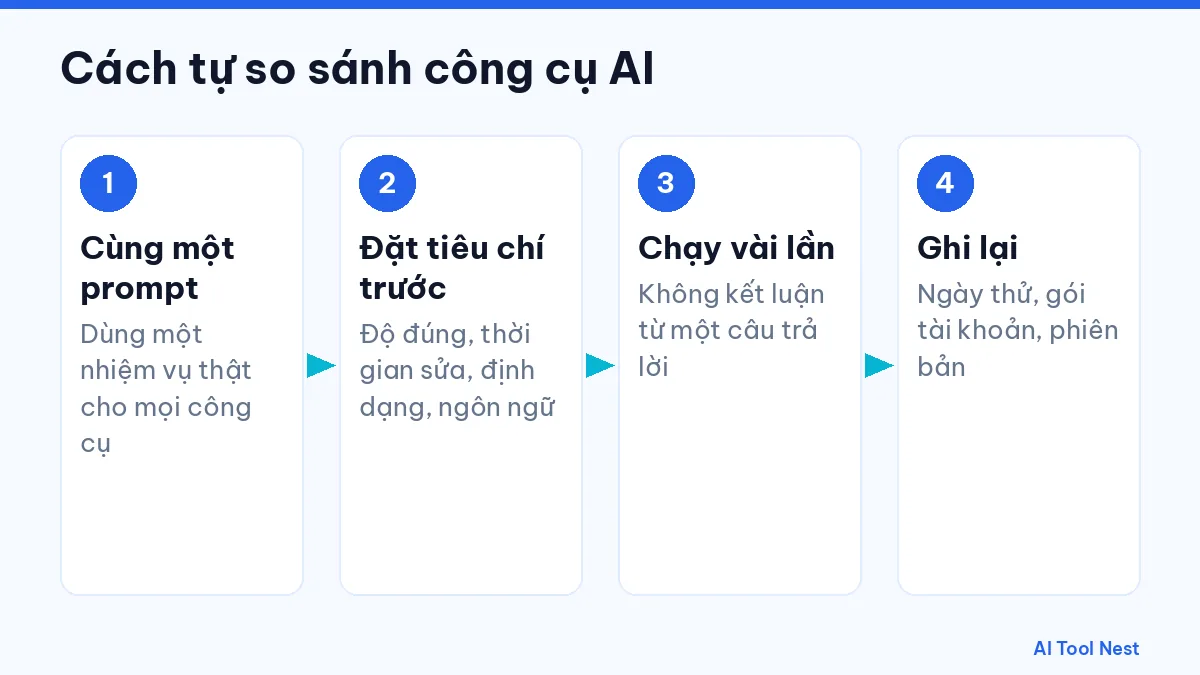
- Pick a real task and write the same prompt for every tool.
- Set your criteria first: accuracy, editing time, format, language.
- Run it several times; never draw conclusions from a single answer.
- Note the test date, the plan and the version if available.
Grab a template from AI prompts to get started.
A scoring table for your own comparison
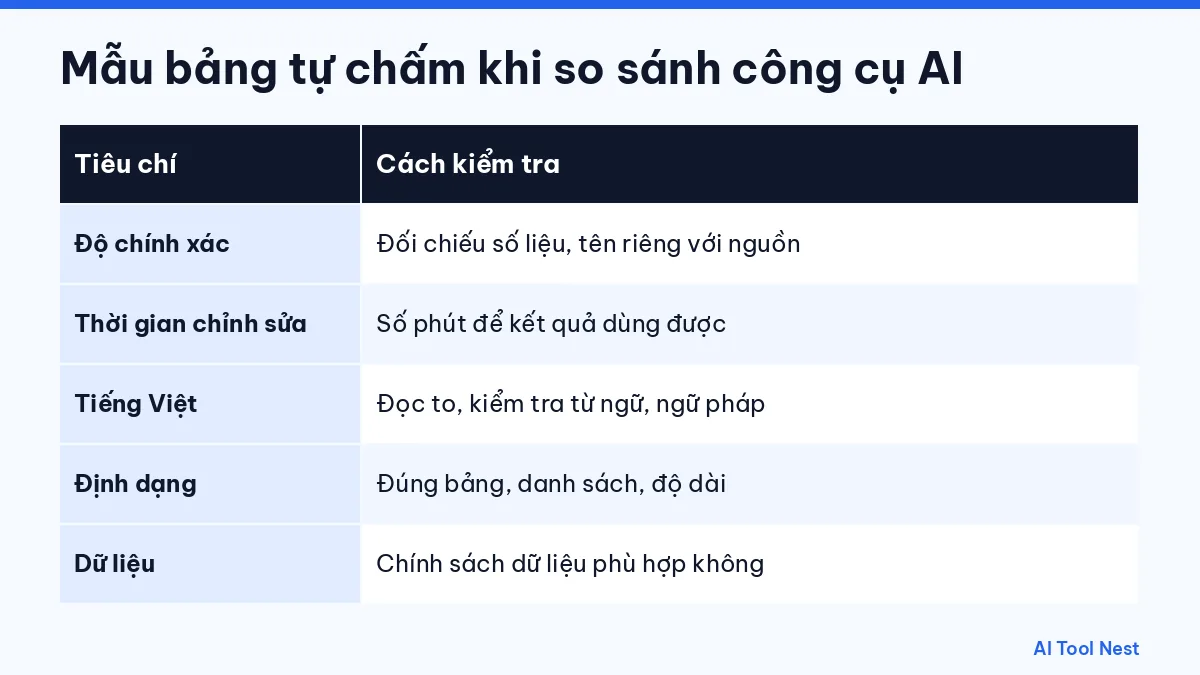
Use the table below when you test the same task across several tools. Score on your own scale and keep your notes so you can compare again when the tools are updated.
| Criterion | How to check | Your notes |
|---|---|---|
| Accuracy | Check figures, names and dates against the source | |
| Editing time | Time how many minutes it takes to make the output usable | |
| Language quality | Read the text aloud and check wording and grammar | |
| Format | Does the output match the table, list or length you asked for? | |
| Data | Does the data policy fit your organization’s rules? |
Common comparison mistakes
- Using a different prompt for each tool and then declaring a winner.
- Testing only once and ignoring the variation between generations.
- Comparing one tool’s free plan with another tool’s paid plan.
- Relying on an old comparison table after features have changed.
Recording the test date and plan keeps your comparison useful for longer. Read more about choosing the right AI tool for your work.
Frequently asked questions
Which is better: ChatGPT, Claude or Gemini?
It depends on your task and content. Run the same request in all three and choose the one whose output needs the least editing.
Do the comparison tables include up-to-date prices?
AIToolNest does not fix prices in tables because they change; please check the official sites.
Should I use several tools at once?
You can. Many people use the free tiers of a few tools and only pay for the one they use every day.
Where do I report incorrect information?
Send the link and a source we can check through our contact page.
Conclusion
Compare AI tools on your real work, not on reputation. See more in the AI tools directory or on the AIToolNest homepage.
Sources: ChatGPT, Claude, Gemini, Canva AI, ElevenLabs, GitHub Copilot, Runway.