Quick answer: In the Claude vs ChatGPT matchup, Claude has the edge in natural long-form writing, reading and analyzing documents, and coding. ChatGPT wins on versatility: image generation, real-time voice chat, scheduled tasks, data analysis and a huge range of integrations. The standard paid plan for both costs about $20 a month. If your main work is writing and code, pick Claude; if you want one assistant that does everything, pick ChatGPT.
This guide compares Claude AI by Anthropic and ChatGPT by OpenAI criterion by criterion, with real examples and recommendations by profession. Plan details were checked against the official Claude pricing page and ChatGPT pricing page, updated October 2026.
Updated: October 30, 2026
Contents
- Quick comparison table
- Writing
- Reading and analyzing documents
- Coding
- Images, voice and multimedia
- Free plans, pricing and limits
- A real-world test
- Ecosystem and integrations
- Privacy
- Which should you choose?
- FAQ
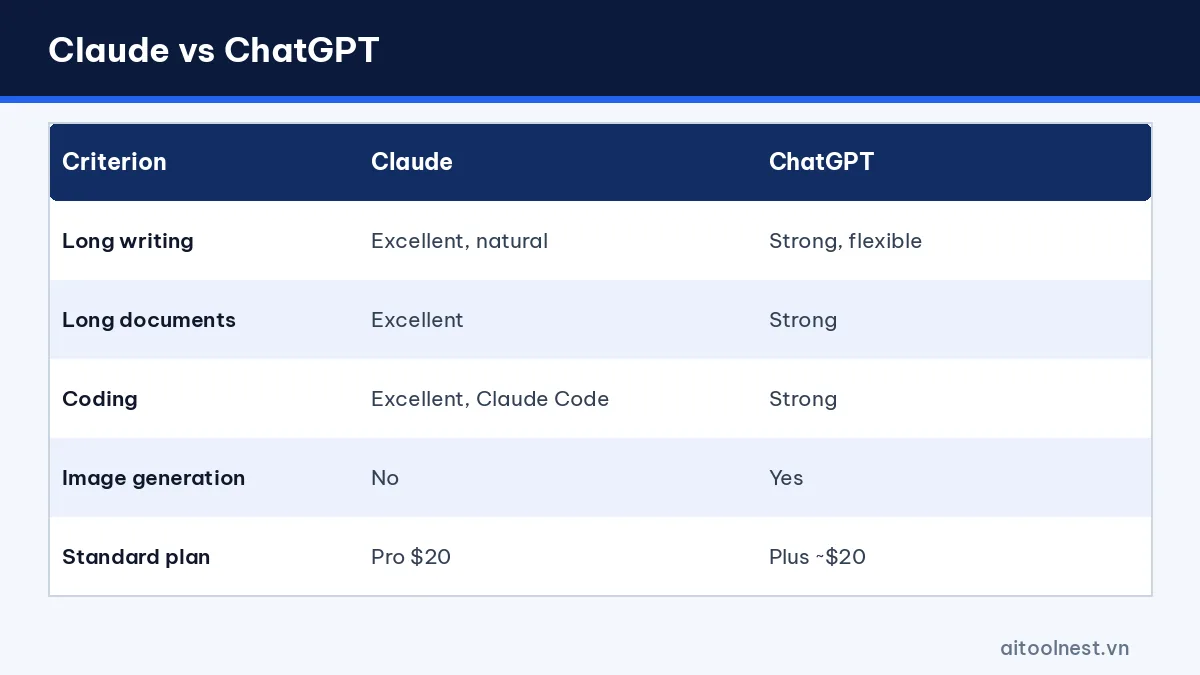
Claude vs ChatGPT: quick comparison table
| Criterion | Claude | ChatGPT |
|---|---|---|
| Company | Anthropic | OpenAI |
| Long-form writing, tone | Excellent, natural | Strong, flexible |
| Long documents | Excellent | Strong |
| Coding | Excellent, includes Claude Code | Strong, has its own coding tools |
| Image generation | No native image generation | Yes |
| Voice | Voice mode available | Excellent, real-time conversation |
| Standard plan | Pro, $20/month | Plus, about $20/month |
| Premium plan | Max, $100 or $200 | Pro |
Writing: Claude has the better voice
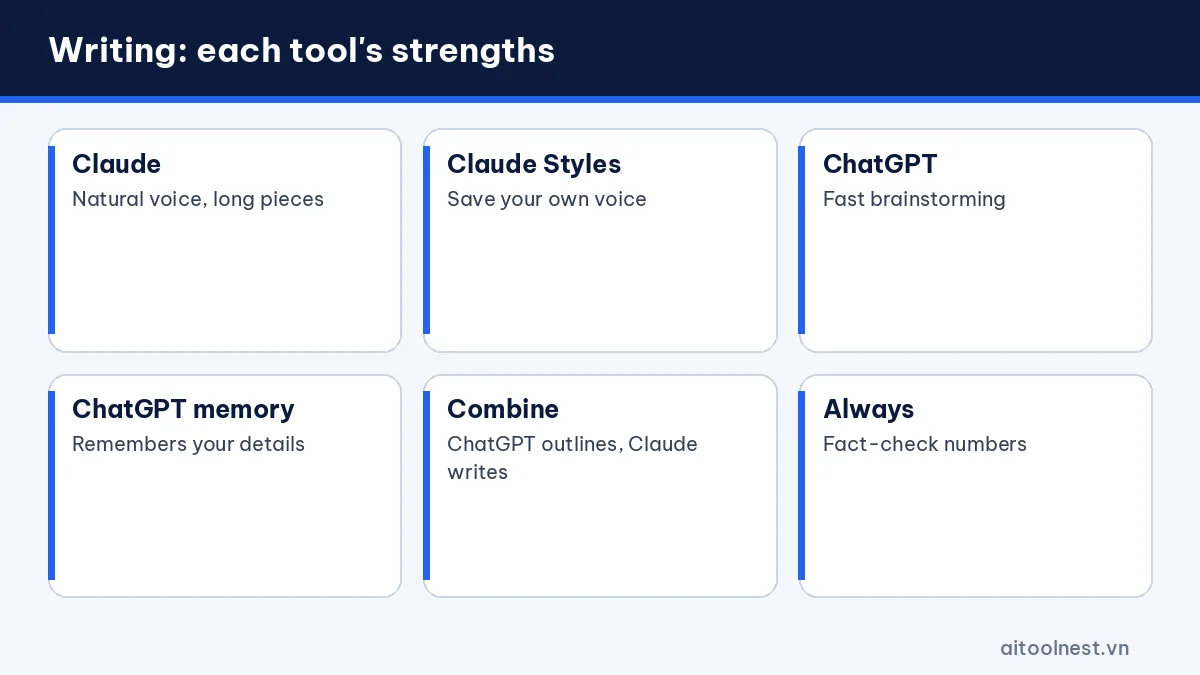
Many professional writers choose Claude because its prose sounds natural, avoids clichés and keeps a consistent tone across long pieces. Give it a writing sample and it imitates the style closely. The Styles feature lets you save your own voice and reuse it.
ChatGPT shines at fast ideation and flexibility: twenty headline options, quick tone changes, social captions with hashtags, short video scripts. Its memory also remembers facts about you across conversations, so you repeat yourself less. Custom instructions let you set a default tone, audience and format once, and ChatGPT applies them to every new chat.
Tip: use ChatGPT for brainstorming and outlines, then let Claude write the final draft. Whichever tool you use, follow our guide on how to write AI prompts and our AI content writing workflow for better results.
Reading and analyzing documents
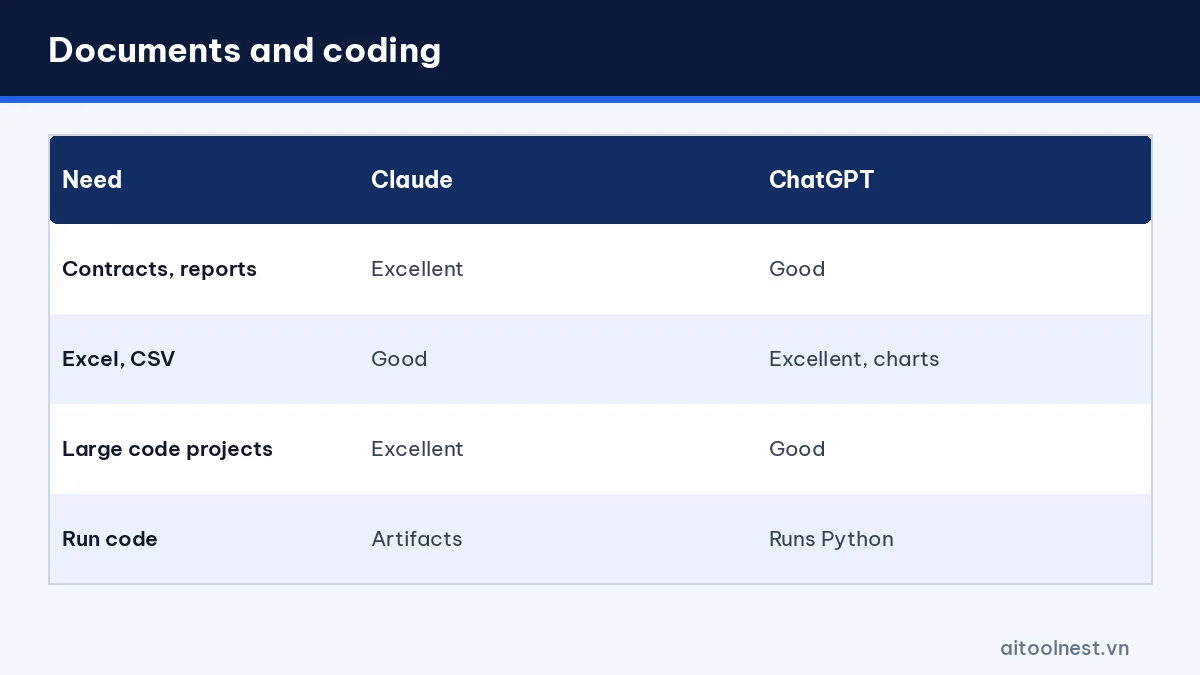
Claude is known for handling long documents well: contracts, reports, books and theses. It summarizes coherently, quotes the right passages and compares several documents at once. Projects let you store reference files so you can reuse them in every chat. This is ideal for recurring work such as weekly reports or a long research project.
ChatGPT also reads PDFs and Word files well and is especially strong with spreadsheets: upload an Excel or CSV file to filter, calculate and draw charts. If your work is number-heavy, ChatGPT is more convenient; if it is text-heavy, Claude is the better pick.
Coding: developers love Claude
The developer community rates Claude highly for understanding large projects, writing long and consistent code and explaining logic clearly. The Pro plan includes Claude Code, which works directly in your terminal and can read and edit many files. ChatGPT is also a strong coding assistant: it can run Python inside the conversation to check results, and paid plans include dedicated coding tools. For beginners learning to code, both explain concepts in plain language.
Images, voice and multimedia: ChatGPT clearly wins
This is where ChatGPT pulls ahead. It creates and edits images from a description, holds real-time voice conversations, can see through your camera, runs scheduled tasks and offers a library of custom GPTs. Claude focuses on text: it reads images you upload but does not generate images natively. Instead, Artifacts can produce charts, diagrams and small interactive web pages.
Free plans, pricing and limits
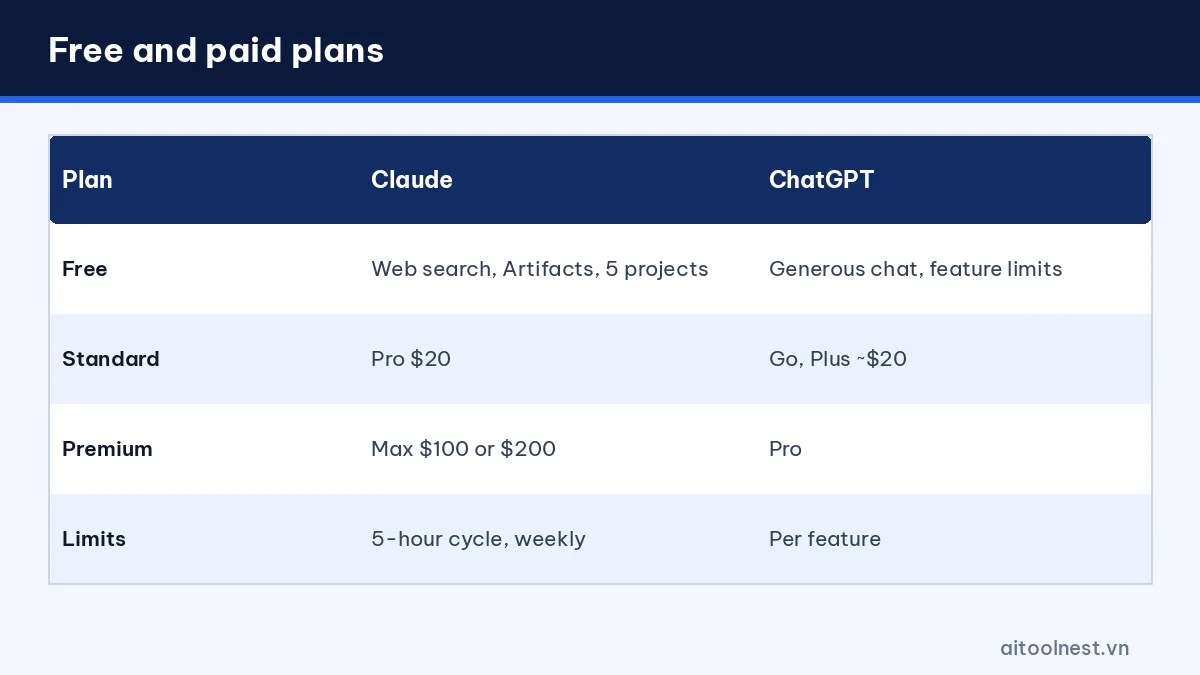
- Claude Free: includes web search, memory, app connectors, Artifacts and up to 5 projects, with usage limits that reset roughly every 5 hours.
- Claude Pro: $20/month ($17 billed annually), adds Claude Code, Research and unlimited projects. Max 5x costs $100 and Max 20x costs $200. Paid plans also have weekly limits.
- ChatGPT Free: generous text chat and Projects, but limited file uploads, image generation, voice and deep research.
- ChatGPT Go, Plus and Pro: Go is the budget plan and already includes scheduled tasks, Plus costs about $20/month with higher limits, and Pro is for very heavy users.
On the free tiers, ChatGPT gives you more relaxed text chat, while Claude includes more advanced features but you can hit its limit quickly when working with long documents.
A real-world test: same request, two answers
We gave both the same prompt: “Write an apology email to a customer whose order arrived three days late, sincere tone, include a 10% discount code.” Claude wrote a smooth, warm email with few template phrases, ready to send after adding the name. ChatGPT produced a shorter version plus three subject-line options and a matching SMS message.
In a second test we uploaded a 12-month revenue sheet and asked for trend insights. ChatGPT calculated totals, drew a chart and pointed out the strongest growth month. Claude analyzed it well and presented clear commentary, and it could build a chart with Artifacts. The results match the general verdict: Claude is strongest with words, ChatGPT is strongest at doing a bit of everything.
Ecosystem and integrations
ChatGPT has desktop and mobile apps, the GPT store and connectors for services such as Google Drive, Gmail and calendars. Claude also offers desktop and mobile apps, a browser extension and app connections through the MCP standard, which let it read data from the tools you already use. For teams, both offer a Team plan with a shared workspace and member management.
Accuracy, speed and web search
Both assistants can make mistakes, invent sources or misremember details, so treat any fact, figure or quote as a draft until you verify it. Claude tends to say when it is unsure and is careful about following instructions precisely, which helps with editing and summarizing. ChatGPT is quick, offers several model modes and is good at pulling recent information from the web with linked sources.
Both can search the web, even on the free plans, and both offer deeper research modes on paid plans that read many pages and return a structured report with citations. For news, prices or anything that changes often, ask either tool to search and cite sources, then open the links yourself before you rely on the answer.
How to use Claude and ChatGPT together
Many power users don’t choose at all. A simple workflow that costs nothing extra on the free plans:
- Brainstorm angles, headlines and an outline in ChatGPT.
- Paste the outline into Claude with your style sample and ask for the full draft.
- Ask ChatGPT to create a cover image or social visuals for the piece.
- Paste the final draft back into either tool and ask it to spot errors, weak arguments and missing points.
This plays to each assistant’s strengths and gives you a built-in second opinion.
Privacy and safety
Both let you control whether your chats are used to improve their models, delete your history and use temporary chats. Business plans come with stronger security commitments. Whichever you choose, never paste passwords, one-time codes or confidential customer data.
Claude vs ChatGPT: which AI should you choose?
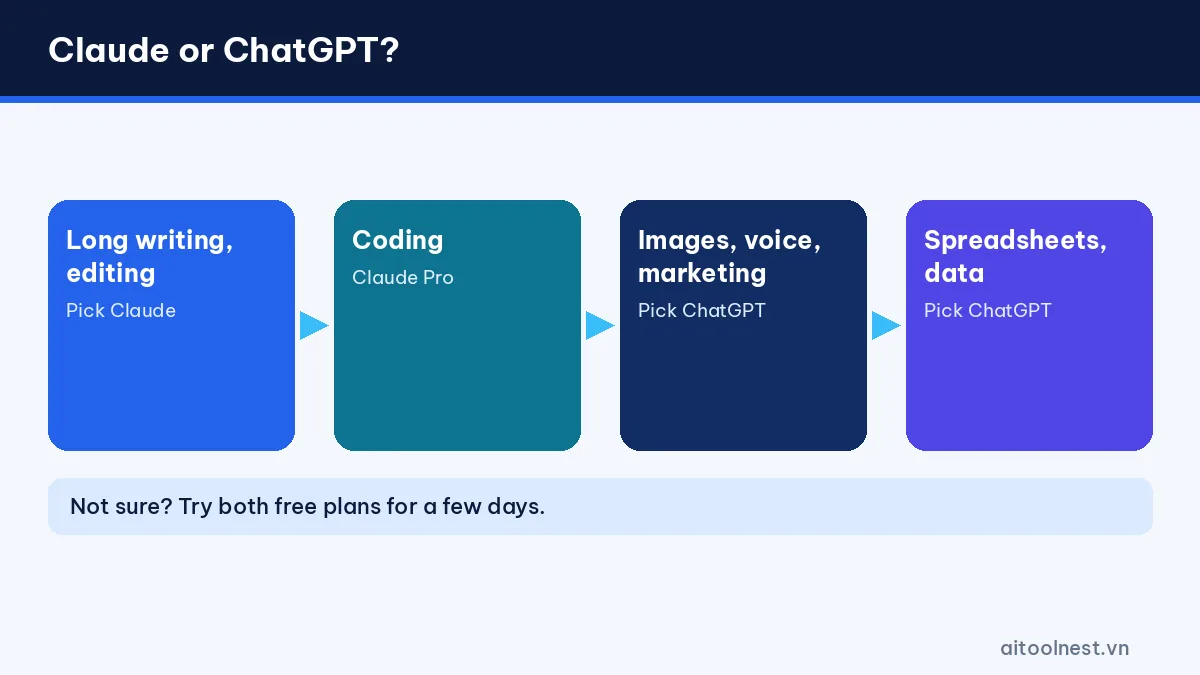
- Writers, editors and long-form creators: Claude.
- Developers: Claude Pro, or ChatGPT Plus if you also need data analysis.
- Marketers and social media managers: ChatGPT, thanks to image generation and fast ideation.
- Students: ChatGPT Free for everyday questions, Claude Free for long readings.
- Office workers handling spreadsheets: ChatGPT.
- Language learners practicing speaking: ChatGPT voice mode.
Want a third option? Read ChatGPT vs Gemini or browse more AI tool comparisons. New to ChatGPT? Our guide on how to use ChatGPT gets you started quickly.
Claude and ChatGPT FAQ
Is Claude better than ChatGPT?
It depends on your needs. Claude is usually better for long writing, document analysis and coding, while ChatGPT is better for images, voice, spreadsheets and integrations.
Can Claude generate images like ChatGPT?
No. Claude can read images you upload but does not generate images natively. Artifacts can create charts, diagrams and small web pages instead.
Which free plan is more generous, Claude or ChatGPT?
ChatGPT Free allows more relaxed text chat. Claude Free includes more features such as web search, Artifacts and projects, but its 5-hour usage cycle runs out faster with long documents.
Should developers use Claude or ChatGPT?
Many developers choose Claude Pro for Claude Code and its handling of large projects. ChatGPT is also strong and handy for running Python and analyzing data.
Should I pay for both Claude and ChatGPT?
Usually not. Pay for one plan for your main work and use the other tool’s free version for a second opinion.
Conclusion
The Claude vs ChatGPT comparison shows there is no absolute winner. Claude is the skilled writer and programmer, while ChatGPT is the versatile assistant with images, voice and many integrations. Since the standard plans cost the same, try both free versions on your own real tasks for a few days, then pay for the one that fits your work best.
